
Appearance
Pylon
使用 Pylon 构建 GraphQL API 简单明了。Pylon 是一个后端框架,建立在 Hono 之上,提供以代码优先的方式进行 GraphQL API 开发。
🌐 Building a GraphQL API with Pylon is simple and straightforward. Pylon is a backend framework that is built on top of Hono and provides code-first GraphQL API development.
GraphQL 模式是根据你的 TypeScript 定义实时生成的,使你可以专注于编写服务逻辑。这种方法显著提高了开发速度,增强了类型安全性,并减少了错误。
🌐 The GraphQL schema is generated in real-time from your TypeScript definitions, allowing you to focus solely on writing your service logic. This approach significantly improves development speed, enhances type safety, and reduces errors.
代码中的任何重大更改都会立即反映在你的 API 中,使你能够立即查看更改如何影响其功能。
🌐 Any breaking changes in your code are instantly reflected in your API, enabling you to immediately see how changes impact its functionality.
查看 Pylon 以获取更多信息。
🌐 Check out the Pylon for more information.
设置新的 Pylon 服务
🌐 Setup new Pylon service
Pylon 允许你使用 npm create pylon 命令创建一个新服务。该命令会创建一个带有基本项目结构和配置的新 Pylon 项目。在设置过程中,你可以选择你偏好的运行时,例如 Bun、Node.js 或 Cloudflare Workers。
🌐 Pylon allows you to create a new service using the npm create pylon command. This command creates a new Pylon project with a basic project structure and configuration. During the setup process, you can choose your preferred runtime, such as Bun, Node.js, or Cloudflare Workers.
本指南使用 Bun 运行时。
创建新项目
🌐 Creating a new project
要创建一个新的 Pylon 项目,请运行以下命令:
🌐 To create a new Pylon project, run the following command:
bash
npm create pylon my-pylon@latest这将创建一个名为 my-pylon 的新目录,并带有一个基础的 Pylon 项目结构。
🌐 This will create a new directory called my-pylon with a basic Pylon project structure.
项目结构
🌐 Project structure
Pylon 项目的结构如下:
🌐 Pylon projects are structured as follows:
my-pylon/
├── .pylon/
├── src/
│   ├── index.ts
├── package.json
├── tsconfig.json.pylon/:包含你项目的生产版本。src/:包含你项目的源代码。src/index.ts:Pylon 服务的入口点。package.json:npm 包配置文件。tsconfig.json:TypeScript 配置文件。
基本示例
🌐 Basic example
以下是一个基本的 Pylon 服务示例:
🌐 Here's an example of a basic Pylon service:
ts
import { app } from '@getcronit/pylon'

export const graphql = {
  Query: {
    sum: (a: number, b: number) => a + b,
  },
  Mutation: {
    divide: (a: number, b: number) => a / b,
  },
}

export default app
保护 API
🌐 Secure the API
Pylon 与 ZITADEL 集成,ZITADEL 是一个云原生的身份和访问管理解决方案,可为你的 API 提供安全的身份验证和授权。你可以按照 ZITADEL 文档 中概述的步骤轻松保护你的 Pylon API。
🌐 Pylon integrates with ZITADEL, a cloud-native identity and access management solution, to provide secure authentication and authorization for your APIs. You can easily secure your Pylon API by following the steps outlined in the ZITADEL documentation.
创建更复杂的 API
🌐 Create a more complex API
Pylon 允许你通过利用其实时模式生成功能来创建更复杂的 API。有关支持的 TypeScript 类型以及如何定义你的 API 的更多信息,请参阅 Pylon 文档
🌐 Pylon allows you to create more complex APIs by leveraging its real-time schema generation capabilities. For more information about supported TypeScript types and how to define your API, refer to the Pylon documentation
这个示例演示了如何在 Pylon 中定义复杂类型和服务。通过利用 TypeScript 类和方法,你可以创建与数据库、外部服务和其他资源交互的强大 API。
🌐 This example demonstrates how to define complex types and services in Pylon. By leveraging TypeScript classes and methods, you can create powerful APIs that interact with databases, external services, and other resources.
ts
import { app } from '@getcronit/pylon'

class Post {
  id: string
  title: string

  constructor(id: string, title: string) {
    this.id = id
    this.title = title
  }
}

class User {
  id: string
  name: string

  constructor(id: string, name: string) {
    this.id = id
    this.name = name
  }

  static async getById(id: string): Promise<User> {
    // Fetch user data from the database
    return new User(id, 'John Doe')
  }

  async posts(): Promise<Post[]> {
    // Fetch posts for this user from the database
    return [new Post('1', 'Hello, world!')]
  }

  async $createPost(title: string, content: string): Promise<Post> {
    // Create a new post for this user in the database
    return new Post('2', title)
  }
}

export const graphql = {
  Query: {
    user: User.getById,
  },
  Mutation: {
    createPost: (userId: string, title: string, content: string) => {
      const user = User.getById(userId)
      return user.$createPost(title, content)
    },
  },
}

export default app
调用 API
🌐 Call the API
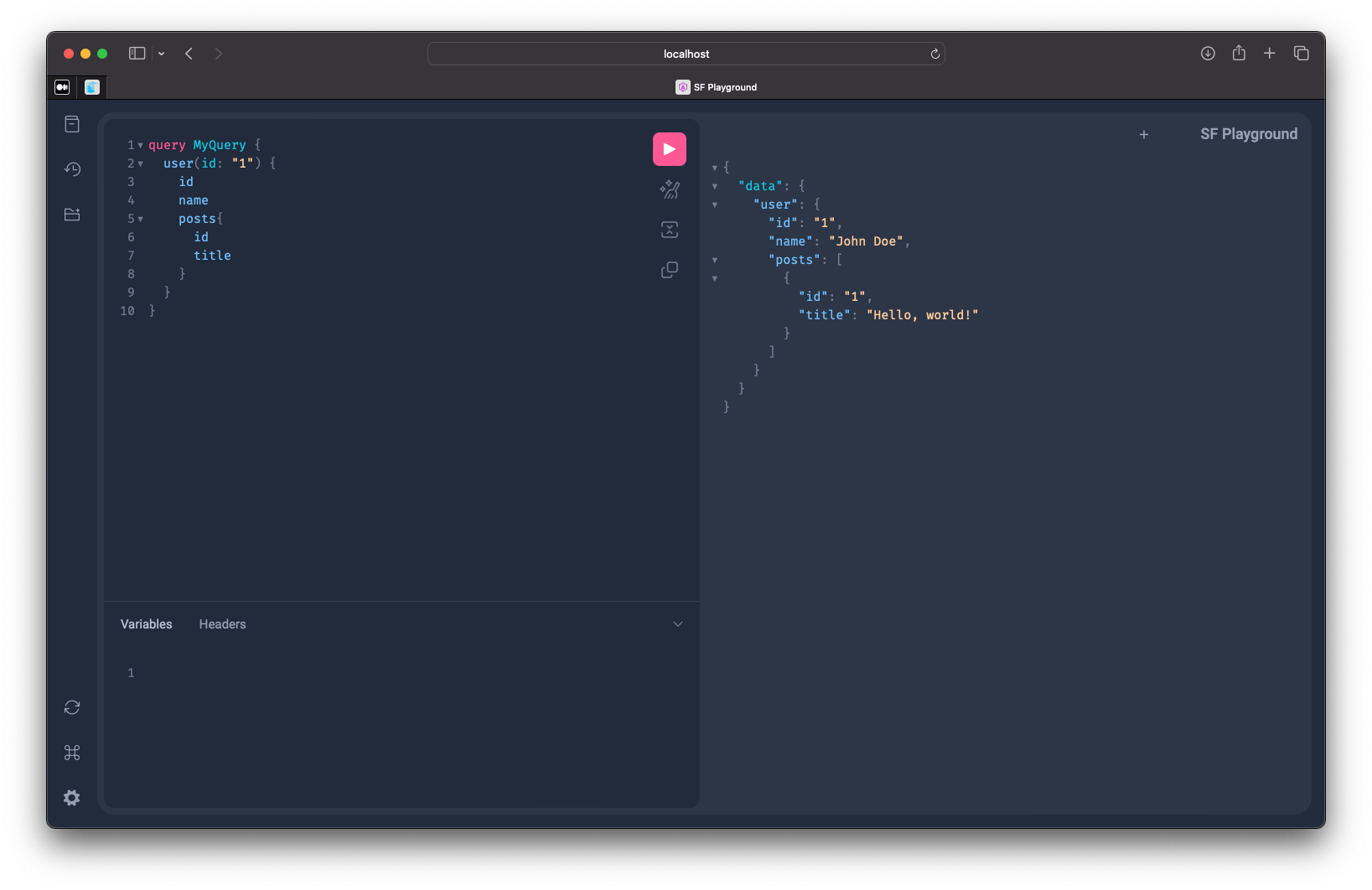
Pylon API 可以使用任何 GraphQL 客户端库调用。出于开发目的,建议使用 Pylon Playground,这是一款基于网页的 GraphQL IDE,允许你实时与你的 API 进行交互。
🌐 The Pylon API can be called using any GraphQL client library. For development purposes, it is recommended to use the Pylon Playground, which is a web-based GraphQL IDE that allows you to interact with your API in real-time.
- 在你的项目目录中运行
bun run dev来启动 Pylon 服务器。 - 通过访问
http://localhost:3000/graphql在浏览器中打开 Pylon Playground。 - 在左侧面板中编写你的 GraphQL 查询或变更。
获取 Hono 上下文访问权限
🌐 Get access to the Hono context
你可以通过使用 getContext 函数在代码的任何地方访问 Hono 上下文。此函数返回当前的上下文对象,该对象包含有关请求、响应以及其他上下文特定数据的信息。
🌐 You can access the Hono context anywhere in your code by using the getContext function. This function returns the current context object, which contains information about the request, response, and other context-specific data.
ts
import { app, getContext } from '@getcronit/pylon'

export const graphql = {
  Query: {
    hello: () => {
      const context = getContext()
      return `Hello, ${context.req.headers.get('user-agent')}`
    },
  },
}

export default app
有关 Hono 上下文对象及其属性的更多信息,请参阅 Hono 文档 和 Pylon 文档。
🌐 For more information about the Hono context object and its properties, refer to the Hono documentation and Pylon documentation.
Hono 的用途是什么?
🌐 Where does Hono fit in?
Pylon 构建在 Hono 之上,Hono 是一个用于构建 Web 应用和 API 的轻量级 Web 框架。Hono 提供处理 HTTP 请求和响应的核心功能,而 Pylon 扩展了这些功能以支持 GraphQL API 开发。
🌐 Pylon is built on top of Hono, a lightweight web framework for building web applications and APIs. Hono provides the core functionality for handling HTTP requests and responses, while Pylon extends this functionality to support GraphQL API development.
除了 GraphQL,Pylon 还允许你访问底层的 Hono 应用实例,以添加自定义路由和中间件。这使你能够构建利用 Hono 全部功能的更复杂的 API 和服务。
🌐 Besides GraphQL, Pylon also lets you access the underlying Hono app instance to add custom routes and middleware. This allows you to build more complex APIs and services that leverage the full power of Hono.
ts
import { app } from '@getcronit/pylon'

export const graphql = {
  Query: {
    sum: (a: number, b: number) => a + b,
  },
  Mutation: {
    divide: (a: number, b: number) => a / b,
  },
}

// Add a custom route to the Pylon app
app.get('/hello', (ctx, next) => {
  return new Response('Hello, world!')
})
总结
🌐 Conclusion
Pylon 是一个强大的网络框架,可以简化 GraphQL API 的开发。通过利用 TypeScript 类型定义,Pylon 提供实时的模式生成,增强类型安全性并减少错误。使用 Pylon,你可以快速构建符合业务需求的安全且可扩展的 API。Pylon 与 Hono 的集成使你能够在专注于 GraphQL API 开发的同时使用 Hono 的所有功能。
🌐 Pylon is a powerful web framework that simplifies the development of GraphQL APIs. By leveraging TypeScript type definitions, Pylon provides real-time schema generation, enhancing type safety and reducing errors. With Pylon, you can quickly build secure and scalable APIs that meet your business requirements. Pylons integration with Hono allows you to use all the features of Hono while focusing on GraphQL API development.
有关 Pylon 的更多信息,请查阅官方文档。
🌐 For more information about Pylon, check out the official documentation.
另请参阅
🌐 See also